This is default featured post 1 title

Go to Blogger edit html and find these sentences.Now replace these sentences with your own descriptions.This theme is Bloggerized by Lasantha Bandara - Premiumbloggertemplates.com.

This is default featured post 2 title

Go to Blogger edit html and find these sentences.Now replace these sentences with your own descriptions.This theme is Bloggerized by Lasantha Bandara - Premiumbloggertemplates.com.

This is default featured post 3 title

Go to Blogger edit html and find these sentences.Now replace these sentences with your own descriptions.This theme is Bloggerized by Lasantha Bandara - Premiumbloggertemplates.com.

This is default featured post 4 title

Go to Blogger edit html and find these sentences.Now replace these sentences with your own descriptions.This theme is Bloggerized by Lasantha Bandara - Premiumbloggertemplates.com.

This is default featured post 5 title

Go to Blogger edit html and find these sentences.Now replace these sentences with your own descriptions.This theme is Bloggerized by Lasantha Bandara - Premiumbloggertemplates.com.

Showing posts with label Adsense. Show all posts

Where to paste the AdSense codes?

Update: This is an old post but is still applicable to those using the old classic Blogger template. Those using the New xml Blogger template should use the HTML/Javascript gadget (Page Element)

Where to paste the AdSense codes? This will depend on where you want the ads on your site. Probably the most prominent place to place it will be just below the header, like on this site. If so:
1. log into Dashboard
2. click the TEMPLATE tab
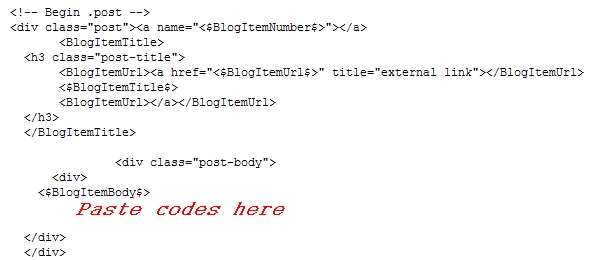
3. look for the codes you see above and paste the codes where you see Paste AdSense codes here

Update: With the newly introduced Blogger Beta, there is now an easier way to put in your AdSense (and other, eg. Amazon) scripts, and to move them around. See Blogger Beta - adding advertisement and hit counter scripts

Books from Amazon

Google Advertising Tools : Cashing in with AdSense, AdWords, and the Google APIs

For ads after each post, where to paste the codes?

Update 8 April 2008: Please note that this post was written before the New xml Blogger template was introduced. It can however be still applicable if you are still using the old classic Blogger template.


(for New Blogger (formerly Beta), please see update at bottom of the post)

If you want the AdSense ads to appear after each posts, paste the codes after the <$BlogItemBody$> as shown in the screenshot above.

Update: AdSense TOS place a maximum of 3 ad units on any page. Strictly, if you have more than 3 posts on the main page, that theoretically will place more than 3 ad units on the main page. I have more than 3 posts for this blog, and I have pasted the AdSense script such that the ad unit get displayed at the top of every page. In fact, I also am supposed to have a Wide Skyscraper ad unit in the sidebar. However, AdSense detect that and do not display the extra ad units. The ad unit in the sidebar will only be displayed when one go to the individual post page (permalink), in which case, only 2 ad units will be displayed, one above that post, and one in the sidebar.

After reading the number of publishers who have their account suspended, I decided to be extra careful. To make sure, I contacted AdSense Help regarding the matter, and the reply was that it is OK for this particular blog. Whether this means we have to get clearance for every blogs that have this feature or not, I do not know. I think I will contact AdSense Help once more to make sure. Sure don't want to have my account suspended. You can leave things as it is and take the chance (or contact AdSense Help Center AdSense Help Center or just take the chance. Or you can ensure you comply with the TOS by adjusting the number of pages that get displayed on your main page, for example, if you only have ads in the post, adjust that to display only 3 pages in the main page).

UPDATE: I have been reading numerous reports of AdSense account holders having their account suspended, often without the exact reason for the suspension being given. I have contacted AdSense Help once more for a more definitive answer but the answer were vague, just referring to the fact that one should have a maximum of 3 ad units on each page. As such, I have decided to stop using this for my site, and instead of putting ads in each post, I have put the leaderboard ad unit just below the header. Better to be safe than be sorry.

ANOTHER UPDATE: Another AdSense Publisher, Sherry, did her ads exactly as described in this post, and contacted AdSense Help Center for clearance. Her blog is here: AdSense and Affiliates. She got this reply:

Hello Sherry,

Thanks for emailing us about our policies.

I've reviewed your website and found the number of Google ads displayed to be in accordance with our program policies. On any given page, you're welcome to place up to:

- three standard ad units
- one link unit
- two search boxes
- four referral units for different products

For additional questions, I'd encourage you to visit the AdSense Help Center
(http://www.google.com/adsense_help), our complete resource center for all AdSense topics. Alternatively, feel free to post your question on the forum just for AdSense publishers: the AdSense Help Group (http://groups.google.com/group/adsense-help).

I hope you find this information helpful.

Sincerely,

Lillian
The Google AdSense Team

So folks, it is really up to you whether you want to use this method to display the AdSense ads or not.

UPDATE 21 January 2007: For New Blogger (formerly beta), please refer to post Incorporate AdSense ads into your New Blogger posts.

UPDATE 9 September 2007: There is an easier way to put Google ads between post now with New Blogger templates. You don't even have to get into the template editor, only the LAYOUT. See Ads bewtween for blogs with New Blogger templates


Books from Amazon

Make Easy Money with Google : Using the AdSense Advertising Program

AdSense ads below post for old classic Blogger template

There are still bloggers who use the old classic Blogger template, some because they have too much customization and too attached to it, and some because they choose to use custom domain and host on their own. Got a guestion on how to add adsense text link ad in below some specific posts.

You cannot add AdSense ads only below the post you choose. There is a way to add ads below the post, but you cannot pick and choose. Blogger will choose for you.

REMINDER: This is worth repeating because it is important. Backup your template before you make any changes to it. Refer to Backup and edit old classic Blogger template

Here is an example of a blog with AdSense ads below the post: Test old classic Blogger template

Anyway, here is how to put ads below Blogger posts. Sign into blogger.com (Dashboard). If you are using the old classic template, you will see a link TEMPLATE in the section of that blog with the classic template. Click on that and you will be taken to the template editor. Look for this block of codes:

<div class="post-body">
<div>
<$BlogItemBody$>
</div>
</div>

Generate the script from your AdSense account and copy-paste below this block of script. Preview, and if satisfied, click "Save template".

If you have any difficulties in finding those codes, copy part of the codes, press CTRL+F, then paste them into the "Find" field in the task bar at the bottom of the page.